Use Ollama to Test Multiple Code Generation Models With Koyeb Sandboxes
What if you could generate code with AI models and execute it safely without ever installing anything on your local machine?
As AI code generation becomes more powerful, developers face a critical challenge: how to safely test and execute AI-generated code without risking their local environment. Running untested code locally can expose your system to security vulnerabilities, dependency conflicts, or unexpected side effects.
Koyeb Sandboxes provide the perfect solution: ephemeral, isolated environments where you can generate code using multiple AI models (like Ollama's llama3.2, codellama, and deepseek-coder) and execute it securely in GPU-enabled cloud instances. All without installing a single dependency on your machine.
In this tutorial, we'll build a complete pipeline that:
- Creates GPU-enabled Koyeb sandboxes on-demand
- Installs and runs Ollama inside isolated environments
- Generates code using multiple AI models simultaneously
- Executes the generated code safely within the sandbox
- Automatically cleans up resources after execution
By the end, you'll have a production-ready system for secure AI code generation and execution, built entirely with open-source tools and Koyeb's serverless infrastructure.
Prerequisites
To complete this tutorial, you will need:
- Basic knowledge of Python and command-line interfaces
- A Koyeb account (Starter, Pro, or Scale Plan) with API access
- Python 3.8+ installed on your local machine
- Note: You do NOT need Ollama installed locally - it runs entirely inside sandboxes!
What we'll build
This tutorial covers the following steps:
- Setting up the Project - Install dependencies and configure API access
- Implementing the Code - Implementing the code to generate sandboxes, install Ollama, and run the code execution
- Running the Pipeline - Generate and execute code with multiple AI models
- Customizing the Pipeline - Configure models, prompts, and GPU settings
Understanding the AI code-generation pipeline
Before diving into the code, it's important to understand how Koyeb Sandboxes enable secure AI code generation and execution.
The security challenge
Traditional AI code generation workflows require:
- Installing AI models locally (consuming disk space and resources)
- Running generated code on your machine (potential security risks)
- Managing dependencies and environments manually
Koyeb Sandboxes solve this by providing:
- Complete Isolation: Each execution happens in a fresh environment
- No Local Installation: AI models run entirely in the cloud
- Automatic Clean-up: Sandboxes are deleted after execution
- GPU Acceleration: Access to powerful GPU instances for faster generation
The pipeline architecture
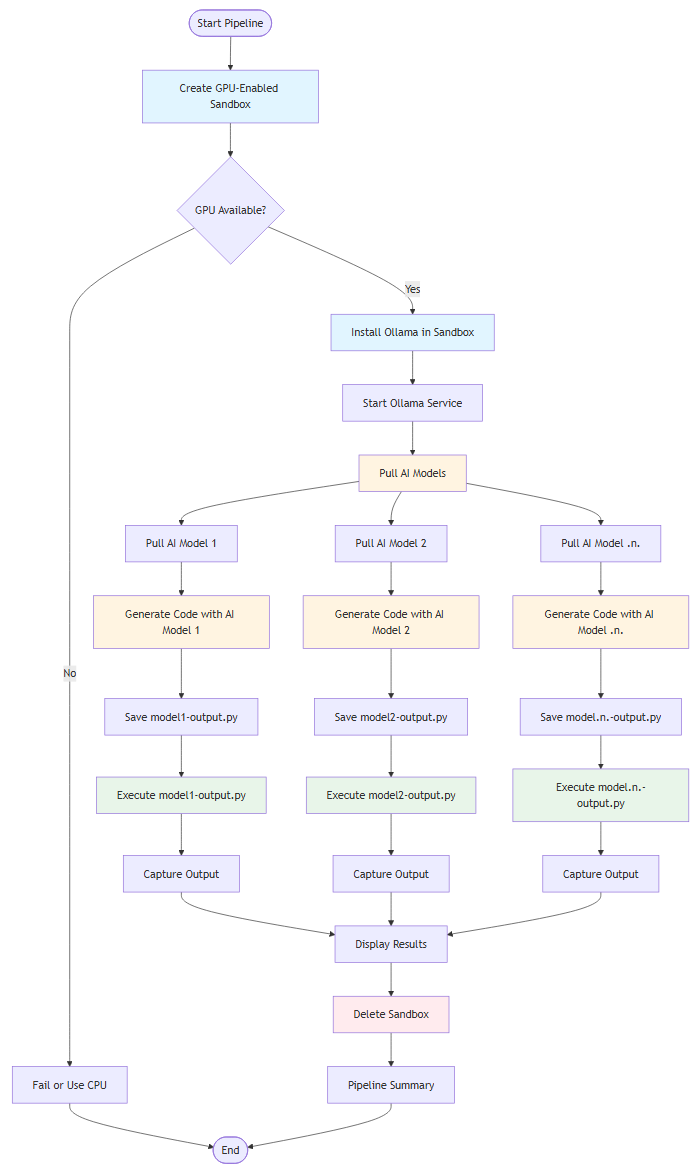
This project can be broken down into three main architectural components: sandbox management, code generation, and code execution.
Sandbox management
The sandbox management component handles the creation and lifecycle of isolated GPU-enabled environments. When you initiate the pipeline from your local machine, it communicates with the Koyeb API to provision a fresh container with GPU support. The system automatically installs all necessary dependencies, including system packages and runtime environments, preparing the sandbox for use.
Code generation
The code generation component orchestrates the process of generating code using multiple AI models that run entirely inside the sandbox. Once the sandbox is ready, Ollama is installed and started as a service within the isolated environment. AI models are then pulled on-demand from Ollama's model registry, downloaded directly into the sandbox. When you provide a code generation prompt, each model processes it independently and generates code. The generated code is automatically saved to separate files, one per model.
Code execution
The code execution component ensures that all generated code runs safely within the isolated sandbox environment. After code is generated and saved to files, each file is executed sequentially within the same sandbox where it was created. The system captures all output, including standard output and error messages, in real-time. Execution results are then displayed to you, showing both the generated code and its runtime output. Once all code has been executed and results are captured, the sandbox is automatically deleted, ensuring no resources remain active and all data is cleaned up.
Setting up the project
Let's start by install the dependencies:
pip install "koyeb-sdk>=1.2.2" "python-dotenv>=1.2.1"
koyeb-sdk- Python SDK for Koyeb Sandboxespython-dotenv- Environment variable management
Get your Koyeb API token
- Go to Koyeb Settings
- Click the API tab
- Click Create API token
- Provide a name (e.g., "sandbox-quickstart") and description
- Click Create and copy the token (you won't be able to see it again)
Configure environment variables
Create a .env file and add your Koyeb API token:
KOYEB_API_TOKEN=your_api_token_here
Implementating the code understanding the code structure
The project consists of two main files:
Let's now see the necessary code necessary to create and setup the sandbox and for generating the code from the AI models.
This will consist of 2 files, the main.py for orchestrating the pipeline and code_generation.py for generating the code with ollama.
main.py - The Pipeline Orchestrator
"""
AI Code Generation and Execution with Koyeb Sandboxes

This application uses Ollama to generate code with multiple AI models
and executes the generated code securely in isolated GPU-enabled Koyeb sandboxes.

All code generation happens inside the sandbox for maximum security and isolation.
"""

import os
import sys
import json
import time
import logging
import argparse
from datetime import datetime
from typing import List, Dict, Optional
from dotenv import load_dotenv
from koyeb import Sandbox

# Load environment variables
load_dotenv()

# Get API token and remove quotes
api_token = os.getenv("KOYEB_API_TOKEN")
api_token = api_token.replace('"', '')

# Configure logging to file and terminal with timestamp
log_filename = f"sandbox_{datetime.now().strftime('%Y%m%d_%H%M%S')}.log"
logging.basicConfig(
    level=logging.INFO,
    format='%(asctime)s - %(levelname)s - %(message)s',
    datefmt='%Y-%m-%d %H:%M:%S',
    handlers=[
        logging.FileHandler(log_filename, encoding='utf-8'),
        logging.StreamHandler(sys.stdout),  # Also log to terminal
    ]
)
logger = logging.getLogger(__name__)

# Class to manage AI code generation and execution in GPU-enabled Koyeb sandboxes
class AICodeSandbox:
    """Manages AI code generation and execution in GPU-enabled Koyeb sandboxes."""

    # Constructor
    def __init__(self, api_token: str, use_gpu: bool = True):
        """
        Initialize the AICodeSandbox.

        Args:
            api_token: Koyeb API token.
            use_gpu: Whether to request GPU-enabled sandbox instances.
            models: List of models to use.
        """

        self.api_token = api_token
        if not self.api_token:
            raise ValueError(
                "Koyeb API token is required."
            )

        self.use_gpu = use_gpu


    # Check if GPU is available in the sandbox
    def _check_gpu_in_sandbox(self, sandbox: Sandbox) -> bool:
        """
        Check if GPU is available in the sandbox.

        Args:
            sandbox: The sandbox instance

        Returns:
            True if GPU is available, False otherwise
        """
        try:
            logger.info("\n")
            logger.info("=" * 60)
            logger.info("Checking GPU in sandbox...")
            logger.info("=" * 60)

            # Check for NVIDIA GPU
            result = sandbox.exec(
                "nvidia-smi --query-gpu=name --format=csv,noheader 2>/dev/null || echo 'no_gpu'",
                timeout=300
            )
            if "no_gpu" not in result.stdout and result.stdout.strip():
                logger.info(f"GPU detected: {result.stdout.strip()}")
                return True
            else:
                logger.info("No GPU detected (running on CPU)")
                return False
        except Exception as e:
            logger.error(f"Error checking GPU: {str(e)}")
            return False

    # Create a sandbox
    def _create_sandbox(self, gpu_instance_type: Optional[str] = None, region: Optional[str] = None):
        sandbox = None
        has_gpu = False
        try:
            logger.info("\n")
            logger.info("=" * 60)
            logger.info("Creating Koyeb sandbox...")
            logger.info("=" * 60)

            # Create GPU-enabled sandbox
            logger.info("Creating Koyeb sandbox with GPU support...")
            sandbox_params = {
                "image": "ubuntu:latest",
                "name": "ai-code-generation-gpu",
                "wait_ready": True,
                "timeout": 300,
                "api_token": self.api_token,
                "instance_type": "small",
            }

            # Specify GPU instance type and region
            if self.use_gpu:
                sandbox_params["instance_type"] = gpu_instance_type
                sandbox_params["region"] = region

            # Create the sandbox
            sandbox = Sandbox.create(**sandbox_params)
            logger.info(f"Sandbox created successfully (ID: {sandbox.id})")

            # Check for GPU
            if self.use_gpu:
                has_gpu = self._check_gpu_in_sandbox(sandbox)
            else:
                has_gpu = False
            return sandbox, has_gpu
        except Exception as e:
            logger.error(f"Error creating sandbox: {str(e)}")
            return None, False

    # Install Ollama in the sandbox
    def _install_ollama_in_sandbox(self, sandbox: Sandbox) -> bool:
        """
        Install Ollama in the sandbox.

        Args:
            sandbox: The sandbox instance

        Returns:
            True if installation successful, False otherwise
        """
        try:
            logger.info("\n")
            logger.info("=" * 60)
            logger.info("Installing Ollama in sandbox...")
            logger.info("=" * 60)

            # Install required packages
            logger.info("Installing system packages...")
            result = sandbox.exec(
                "(apt-get update -qq && apt-get install -y -qq curl procps lshw python3 python3-pip python3-requests) 2>&1",
                timeout=300,
                on_stdout=lambda data: logger.info(data.strip()),
                on_stderr=lambda data: logger.error(data.strip())
            )
            if result.exit_code != 0:
                logger.error("Failed to install required packages")
                return False

            # Download and install Ollama
            logger.info("Downloading and installing Ollama...")
            result = sandbox.exec(
                "(curl -fsSL https://ollama.com/install.sh | sh) 2>&1",
                timeout=300,
                on_stdout=lambda data: logger.info(data.strip()),
                on_stderr=lambda data: logger.error(data.strip())
            )
            if result.exit_code != 0:
                logger.error(f"Failed to install Ollama: {result.stderr}")
                return False

            # Start Ollama service in background
            logger.info("Starting Ollama service...")
            sandbox.launch_process("ollama serve")

            # Wait for Ollama to start
            max_retries = 30
            for i in range(max_retries):
                time.sleep(1)
                result = sandbox.exec("ollama list 2>&1", timeout=300)
                if result.exit_code == 0:
                    logger.info("Ollama started successfully")
                    return True
                else:
                    logger.error(f"Ollama failed to start: {result.stderr}")
                    return False
            logger.error(f"Ollama failed to start after {max_retries} retries")
            return False
        except Exception as e:
            logger.error(f"Error installing Ollama: {str(e)}")
            return False

    # Pull a model in the sandbox
    def _pull_model_in_sandbox(self, sandbox: Sandbox, model) -> bool:
        """
        Pull a model in the sandbox.

        Args:
            sandbox: The sandbox instance
            model: Model to pull

        Returns:
            True if pulling model successful, False otherwise
        """
        try:
            logger.info("\n")
            logger.info("=" * 60)
            logger.info(f"Pulling models in sandbox...")
            logger.info("=" * 60)

            # Pull the model
            logger.info(f"Pulling model {model} in sandbox...")
            result = sandbox.exec(f"ollama pull {model} 2>&1",
                timeout=300,
                on_stdout=lambda data: logger.info(data.strip()),
                on_stderr=lambda data: logger.error(data.strip())
            )
            if result.exit_code == 0:
                logger.info(f"Model {model} pulled successfully")
                return True
            else:
                logger.error(f"Failed to pull model {model}: {result.stderr}")
                return False
        except Exception as e:
            logger.error(f"Error pulling model {model}: {str(e)}")
            return False

    # Generate code in the sandbox
    def _generate_code_in_sandbox(self, sandbox: Sandbox, model: str, prompt: str, output: str) -> (bool, str):
        """
        Generate code in the sandbox.

        Args:
            sandbox: The sandbox instance
            model: Model to use
            prompt: Prompt to send to the model
            output: Output file to save the generated code

        Returns:
            True if generation successful, False otherwise
            Filename of the generated code
        """
        try:
            logger.info("\n")
            logger.info("=" * 60)
            logger.info("Generating code in sandbox...")
            logger.info("=" * 60)

            # Copy file code_generation.py to sandbox
            fs = sandbox.filesystem
            fs.upload_file("code_generation.py", "/tmp/code_generation.py")
            logger.info(f"Code generation.py uploaded to sandbox")

            # Execute code_generation.py
            filename = f"/tmp/{model}-{output}"
            logger.info(f"Executing code_generation.py with model {model}, prompt {prompt}, and output {filename}")
            result = sandbox.exec(f"python3 /tmp/code_generation.py {model} \"{prompt}\" \"{filename}\" 2>&1",
                timeout=300,
                on_stdout=lambda data: logger.info(data.strip()),
                on_stderr=lambda data: logger.error(data.strip())
            )
            if result.exit_code == 0:
                logger.info(f"Code generated successfully")
                return True, filename
            else:
                logger.error(f"Failed to generate code: {result.stderr}")
                return False, ""
        except Exception as e:
            logger.error(f"Error generating code with {model}: {str(e)}")
            return False, ""

    # Execute code in the sandbox
    def _execute_code_in_sandbox(self, sandbox: Sandbox, filename: str) -> bool:
        """
        Execute code in the sandbox.

        Args:
            sandbox: The sandbox instance
            filename: Filename of the code to execute

        Returns:
            True if execution successful, False otherwise
        """
        try:
            logger.info("\n")
            logger.info("=" * 60)
            logger.info("Executing code in sandbox...")
            logger.info("=" * 60)

            # Print the code to execute
            fs = sandbox.filesystem
            file_info = fs.read_file(filename)
            logger.info(f"Code to execute:\n")
            logger.info(file_info.content)
            logger.info("-" * 60)

            # Execute the code
            logger.info(f"Executing code in sandbox, file: {filename}...")
            result = sandbox.exec(f"python3 {filename} 2>&1",
                timeout=300,
                on_stdout=lambda data: logger.info(data.strip()),
                on_stderr=lambda data: logger.error(data.strip())
            )
            if result.exit_code == 0:
                logger.info(f"Code executed successfully")
                logger.info("-" * 60)
                logger.info("Result:")
                logger.info(result.stdout.strip())
                logger.info("-" * 60)
                return True
            else:
                logger.error(f"Failed to execute code: {result.stderr}")
                return False
        except Exception as e:
            logger.error(f"Error executing code: {str(e)}")
            return False


    # Delete the sandbox
    def _delete_sandbox(self, sandbox: Sandbox) -> bool:
        """
        Delete the sandbox.

        Args:
            sandbox: The sandbox instance

        Returns:
            True if deletion successful, False otherwise
        """
        try:
            logger.info("\n")
            logger.info("=" * 60)
            logger.info(f"Deleting sandbox...")
            logger.info("=" * 60)

            # Delete the sandbox
            logger.info(f"Deleting sandbox {sandbox.id}...")
            sandbox.delete()
            logger.info(f"Sandbox {sandbox.id} deleted successfully")
            return True
        except Exception as e:
            logger.error(f"Error deleting sandbox {sandbox.id}: {str(e)}")
            return False

# Pipeline to generate code and execute it
def pipeline(
    models: Optional[List[str]] = None,
    prompt: Optional[str] = None,
    output_filename: Optional[str] = None,
    gpu_instance_type: Optional[str] = None,
    region: Optional[str] = None,
    use_gpu: bool = True,
    require_gpu: bool = True
):
    """
    Main pipeline to generate and execute code using AI models in Koyeb sandboxes.

    Args:
        models: List of AI models to use (default: ["llama3.2", "codellama", "deepseek-coder"])
        prompt: Code generation prompt (default: "Write a Python program to calculate factorial of n=5. It should use a function.")
        output_filename: Base output filename (default: "output.py")
        gpu_instance_type: GPU instance type (default: "gpu-nvidia-rtx-4000-sff-ada")
        region: Koyeb region (default: "fra")
        use_gpu: Whether to request GPU-enabled sandbox (default: True)
        require_gpu: Whether to fail if GPU is not available (default: True)

    Returns:
        True if pipeline completed successfully, False otherwise
    """
    # Set default values
    if models is None:
        models = ["llama3.2", "codellama", "deepseek-coder"]
    if prompt is None:
        prompt = "Write a Python program to calculate factorial of n=5. It should use a function."
    if output_filename is None:
        output_filename = "output.py"
    if gpu_instance_type is None:
        gpu_instance_type = "gpu-nvidia-rtx-4000-sff-ada"
    if region is None:
        region = "fra"

    # Log the pipeline start
    logger.info("\n")
    logger.info("=" * 60)
    logger.info("Starting AI Code Generation and Execution with Koyeb Sandboxes")
    logger.info("=" * 60)
    logger.info(f"Models: {', '.join(models)}")
    logger.info(f"Prompt: {prompt}")
    logger.info(f"Output filename: {output_filename}")
    logger.info(f"GPU instance type: {gpu_instance_type}")
    logger.info(f"Region: {region}")
    logger.info(f"Use GPU: {use_gpu}, Require GPU: {require_gpu}")

    # Initialize the sandbox and sandbox manager
    sandbox = None
    sandbox_manager = None

    # Initialize the statistics
    stats = {
        "models_pulled": 0,
        "code_generated": 0,
        "code_executed": 0,
        "errors": 0
    }

    try:
        # Create the sandbox manager
        sandbox_manager = AICodeSandbox(api_token, use_gpu=use_gpu)

        # Create the sandbox
        sandbox, has_gpu = sandbox_manager._create_sandbox(gpu_instance_type, region)
        if not sandbox:
            logger.error("Failed to create sandbox")
            return False

        # Check GPU requirement
        if require_gpu and not has_gpu:
            logger.error("GPU is required but not available in sandbox")
            return False
        elif use_gpu and not has_gpu:
            logger.warning("GPU was requested but not available. Continuing with CPU...")

        # Install Ollama
        if not sandbox_manager._install_ollama_in_sandbox(sandbox):
            logger.error("Failed to install Ollama in sandbox")
            return False

        # Process each model
        for model in models:
            logger.info("\n")
            logger.info("=" * 60)
            logger.info(f"Processing model: {model}")
            logger.info("=" * 60)

            # Pull model
            if not sandbox_manager._pull_model_in_sandbox(sandbox, model):
                logger.error(f"Failed to pull model {model}, skipping...")
                stats["errors"] += 1
            else:
                stats["models_pulled"] += 1

            # Generate code
            success, filename = sandbox_manager._generate_code_in_sandbox(
                sandbox, model, prompt, output_filename
            )
            if not success or not filename:
                logger.error(f"Failed to generate code with model {model}, skipping...")
                stats["errors"] += 1
            else:
                stats["code_generated"] += 1

            # Execute code
            if sandbox_manager._execute_code_in_sandbox(sandbox, filename):
                stats["code_executed"] += 1
            else:
                logger.error(f"Code execution failed for model {model}")
                stats["errors"] += 1

        # Print summary
        logger.info("\n")
        logger.info("=" * 60)
        logger.info("Pipeline Summary")
        logger.info("=" * 60)
        logger.info(f"Models pulled: {stats['models_pulled']}/{len(models)}")
        logger.info(f"Code generated: {stats['code_generated']}/{len(models)}")
        logger.info(f"Code executed: {stats['code_executed']}/{len(models)}")
        logger.info(f"Errors: {stats['errors']}")

        # Check if the pipeline completed successfully
        success = stats["code_executed"] > 0
        if success:
            logger.info("Pipeline completed successfully!")
        else:
            logger.error("Pipeline completed with errors or no successful executions")

        return success

    except Exception as e:
        logger.error(f"Unexpected error in pipeline: {str(e)}", exc_info=True)
        return False

    finally:
        # Always cleanup sandbox
        if sandbox:
            try:
                sandbox_manager._delete_sandbox(sandbox)
            except Exception as e:
                logger.error(f"Error during sandbox cleanup: {str(e)}")

if __name__ == "__main__":
    # Parse command-line arguments
    parser = argparse.ArgumentParser(
        description="Generate and execute AI code using Ollama models in Koyeb sandboxes",
        formatter_class=argparse.RawDescriptionHelpFormatter,
        epilog="""
            Examples:
            %(prog)s
            %(prog)s --prompt "Write a Python function to calculate prime numbers"
            %(prog)s --models llama3.2 codellama --prompt "Create a REST API"
            %(prog)s --instance-type gpu-nvidia-rtx-4000-sff-ada --region fra
            %(prog)s --no-require-gpu  # Allow CPU fallback
            %(prog)s --no-gpu  # Use CPU-only sandbox
        """
    )

    parser.add_argument(
        "--models",
        nargs="+",
        default=["llama3.2", "codellama", "deepseek-coder"],
        help="AI models to use (default: llama3.2 codellama deepseek-coder)"
    )

    parser.add_argument(
        "--prompt",
        type=str,
        default="Write a Python program to calculate factorial of n=5. It should use a function.",
        help="Code generation prompt"
    )

    parser.add_argument(
        "--output",
        type=str,
        default="output.py",
        dest="output_filename",
        help="Output filename for generated code (default: output.py)"
    )

    parser.add_argument(
        "--instance-type",
        type=str,
        default="gpu-nvidia-rtx-4000-sff-ada",
        dest="gpu_instance_type",
        help="GPU instance type (default: gpu-nvidia-rtx-4000-sff-ada)"
    )

    parser.add_argument(
        "--region",
        type=str,
        default="fra",
        help="Koyeb region (default: fra)"
    )

    parser.add_argument(
        "--no-gpu",
        action="store_true",
        help="Use CPU-only sandbox (disable GPU)"
    )

    parser.add_argument(
        "--no-require-gpu",
        action="store_true",
        help="Allow CPU fallback if GPU is not available"
    )

    args = parser.parse_args()

    # Determine GPU settings
    use_gpu = not args.no_gpu
    require_gpu = not args.no_require_gpu

    # Run the pipeline with parsed arguments
    success = pipeline(
        models=args.models,
        prompt=args.prompt,
        output_filename=args.output_filename,
        gpu_instance_type=args.gpu_instance_type,
        region=args.region,
        use_gpu=use_gpu,
        require_gpu=require_gpu
    )

    sys.exit(0 if success else 1)
This file manages the entire workflow:
- Sandbox Creation: Creates GPU-enabled Koyeb sandboxes
- Ollama Installation: Automatically installs and starts Ollama inside the sandbox
- Model Management: Pulls AI models on-demand
- Code Generation: Orchestrates code generation across multiple models
- Code Execution: Runs generated code and captures results
- Clean-up: Ensures sandboxes are always deleted, even on errors
The file begins by loading environment variables from a .env file, extracting the Koyeb API token required for sandbox operations. It sets up comprehensive logging that writes to both a timestamped log file and the console, ensuring all operations are tracked for debugging and monitoring purposes.
The core of the application is the AICodeSandbox class, which encapsulates all sandbox operations:
__init__: Initializes the class with the API token and GPU preference. Validates that an API token is provided before proceeding._check_gpu_in_sandbox: Verifies GPU availability by executingnvidia-smiwithin the sandbox. This method detects NVIDIA GPUs and logs the GPU name if available, or indicates CPU-only operation._create_sandbox: Creates a new Koyeb sandbox instance. It configures sandbox parameters including the image, instance type (GPU or CPU), and region. The method waits for the sandbox to be ready and then checks for GPU availability if GPU was requested._install_ollama_in_sandbox: Handles the complete Ollama installation process. First, it installs system dependencies (curl, Python, etc.) usingapt-get. Then it downloads and installs Ollama using the official installation script. Finally, it starts the Ollama service as a background process and verifies it's running by checking ifollama listcommand succeeds._pull_model_in_sandbox: Downloads AI models into the sandbox using Ollama's pull command. The method streams output in real-time, allowing you to monitor download progress. It handles errors gracefully, logging failures without stopping the entire pipeline._generate_code_in_sandbox: Orchestrates code generation for a specific model. It uploads thecode_generation.pyscript to the sandbox (which we will see next), then executes it with the model name, prompt, and output filename as arguments. The generated code is saved to a unique file per model in the/tmpdirectory._execute_code_in_sandbox: Executes the generated code safely within the sandbox. It first reads and displays the code that will be executed, then runs it. All output (stdout and stderr) is captured and logged in real-time, providing visibility into execution results._delete_sandbox: Ensures proper clean-up by deleting the sandbox after all operations complete. This method is critical for cost control and resource management.
The pipeline function orchestrates the entire workflow:
- Initialization: Sets default values for models, prompts, output filenames, GPU instance types, and regions if not provided.
- Sandbox Lifecycle: Creates a sandbox manager, provisions a sandbox, and verifies GPU availability based on requirements.
- Ollama Setup: Installs and starts Ollama within the sandbox, making it ready for model operations.
- Model Processing Loop: For each specified model, the pipeline:
- Pulls the model (with error handling)
- Generates code using that model
- Executes the generated code
- Tracks statistics for each operation
- Statistics and Summary: Collects and displays comprehensive statistics including models pulled, code files generated, executions completed, and errors encountered.
code_generation.py - The code generator
#!/usr/bin/env python3
"""
Code Generation Tool using Ollama

This application generates code using Ollama models based on a prompt
and saves the generated code to a file.
"""

import argparse
import sys
import re
import requests
from pathlib import Path

# Extract code from markdown
def extract_code_from_markdown(text: str) -> str:
    """
    Extract code from markdown code blocks or return text as-is.

    Args:
        text: Text that may contain markdown code blocks

    Returns:
        Extracted code without markdown formatting
    """
    if not text:
        return ""

    # Remove leading/trailing whitespace
    text = text.strip()

    # Try to find code blocks with language tags (```python, ```bash, etc.)
    code_block_pattern = r'```(?:\\w+)?\\n?(.*?)```'
    matches = re.findall(code_block_pattern, text, re.DOTALL)
    if matches:
        # Return the first code block found
        return matches[0].strip()

    # Try to find code blocks without language tags
    if text.startswith("```"):
        lines = text.split("\\n")
        # Remove opening ```
        if lines[0].startswith("```"):
            lines = lines[1:]
        # Remove closing ```
        if lines and lines[-1].strip() == "```":
            lines = lines[:-1]
        return "\\n".join(lines).strip()

    # If no code blocks, return as-is (might be plain code)
    return text

# Generate code with Ollama
def generate_code_with_ollama(
    model: str,
    prompt: str,
    ollama_host: str = "<http://127.0.0.1:11434>",
    timeout: int = 300
) -> str:
    """
    Generate code using Ollama API.

    Args:
        model: Ollama model name to use
        prompt: The prompt for code generation
        ollama_host: Ollama API host URL (default: <http://127.0.0.1:11434>)
        timeout: Request timeout in seconds (default: 300)

    Returns:
        Generated code as a string

    Raises:
        requests.exceptions.RequestException: If the API request fails
        ValueError: If the response is empty or invalid
    """
    url = f"{ollama_host}/api/generate"

    # Enhanced prompt with clear instructions
    enhanced_prompt = (
        f"{prompt}\\n\\n"
        "CRITICAL INSTRUCTIONS:\\n"
        "- Output ONLY executable code\\n"
        "- Do NOT include markdown code blocks (no ``` or ```)\\n"
        "- Do NOT include explanations, comments about the code, or any text before/after\\n"
        "- Do NOT include language tags or formatting\\n"
        "- Return pure, runnable code starting from the first line\\n"
        "Your response must be code that can be executed directly without any modifications."
    )

    # Define the payload for the API request
    payload = {
        "model": model,
        "prompt": enhanced_prompt,
        "stream": False
    }

    # Print the prompt and model
    print(f"Generating code with model '{model}'...\\n")
    print(f"Prompt: {prompt[:100]}{'...' if len(prompt) > 100 else ''}...\\n")
    print("This may take a while...\\n")

    try:
        # Make the API request
        response = requests.post(url, json=payload, timeout=timeout)
        response.raise_for_status()

        # Get the response
        result = response.json()
        generated_text = result.get("response", "").strip()

        # Check if the response is empty
        if not generated_text:
            raise ValueError("Empty response from Ollama")

        # Extract code from the response
        code = extract_code_from_markdown(generated_text)

        # Check if the code is empty
        if not code:
            raise ValueError("No code extracted from response")

        # Return the code
        return code

    except requests.exceptions.Timeout:
        raise requests.exceptions.Timeout(
            f"Request timed out after {timeout} seconds. "
            "The model may be too slow or the prompt too complex."
        )
    except requests.exceptions.ConnectionError:
        raise requests.exceptions.ConnectionError(
            f"Could not connect to Ollama at {ollama_host}. "
            "Make sure Ollama is running and accessible."
        )
    except requests.exceptions.RequestException as e:
        raise requests.exceptions.RequestException(f"Request failed: {str(e)}")

# Save code to a file
def save_code_to_file(code: str, output_file: str) -> None:
    """
    Save generated code to a file.

    Args:
        code: The code to save
        output_file: Path to the output file
    """
    # Create the output path
    output_path = Path(output_file)

    # Create parent directories if they don't exist
    output_path.parent.mkdir(parents=True, exist_ok=True)

    # Write the code to the file
    with open(output_path, 'w', encoding='utf-8') as f:
        f.write(code)

    # Print the output path and file size
    print(f"Code saved to: {output_path.absolute()}")
    print(f"File size: {len(code)} characters ({len(code.splitlines())} lines)")

def main():
    """Main entry point for the application."""
    # Parse the arguments
    parser = argparse.ArgumentParser(
        description="Generate code using Ollama models",
        formatter_class=argparse.RawDescriptionHelpFormatter

    )

    # Add the model argument
    parser.add_argument(
        "model",
        help="Ollama model name (e.g., llama3.2, codellama, deepseek-coder)"
    )

    # Add the prompt argument
    parser.add_argument(
        "prompt",
        help="Prompt describing the code to generate"
    )

    # Add the output argument
    parser.add_argument(
        "output",
        help="Output filename for the generated code"
    )

    # Add the host argument
    parser.add_argument(
        "--host",
        default="<http://127.0.0.1:11434>",
        help="Ollama API host URL (default: <http://127.0.0.1:11434>)"
    )

    # Add the timeout argument
    parser.add_argument(
        "--timeout",
        type=int,
        default=300,
        help="Request timeout in seconds (default: 300)"
    )

    # Parse the arguments
    args = parser.parse_args()

    try:
        # Generate the code
        code = generate_code_with_ollama(
            model=args.model,
            prompt=args.prompt,
            ollama_host=args.host,
            timeout=args.timeout
        )

        # Save to file
        save_code_to_file(code, args.output)

        # Print the success message and return the success code
        print("Code generation completed successfully!")
        return 0

    except requests.exceptions.ConnectionError as e:
        print(f"Connection Error: {e}", file=sys.stderr)
        # Return the error code
        return 1

    except requests.exceptions.Timeout as e:
        print(f"Timeout Error: {e}", file=sys.stderr)
        # Return the error code
        return 1

    except requests.exceptions.RequestException as e:
        print(f"Request Error: {e}", file=sys.stderr)
        # Return the error code
        return 1

    except ValueError as e:
        print(f"Error: {e}", file=sys.stderr)
        # Return the error code
        return 1

    except KeyboardInterrupt:
        print("Operation cancelled by user.", file=sys.stderr)
        # Return the error code
        return 130

    except Exception as e:
        print(f"Unexpected error: {e}", file=sys.stderr)
        # Return the error code
        return 1

if __name__ == "__main__":
    # Exit the program with the return code
    sys.exit(main())
This script runs inside the sandbox to:
- Connect to Ollama: Communicates with the local Ollama instance
- Generate Code: Sends prompts to AI models and receives generated code
- Extract Code: Cleans markdown formatting from model responses
- Save Files: Writes generated code to files in the sandbox
The extract_code_from_markdown function is crucial for handling AI model responses, which often include code wrapped in markdown code blocks. It uses regular expressions to:
- Detect code blocks with language tags (e.g.,
pythonorbash) - Handle code blocks without language tags
- Extract the actual code content while removing markdown formatting
- Return plain code that can be executed directly
This ensures that even if models return code wrapped in markdown, the extracted code is clean and executable.
The generate_code_with_ollama function handles communication with the Ollama API:
- Enhanced Prompts: Automatically enhances user prompts with critical instructions that tell the model to output only executable code, without markdown formatting, explanations, or comments. This significantly improves the quality of generated code.
- API Communication: Makes HTTP POST requests to Ollama's
/api/generateendpoint. - Response Processing: Extracts the generated code from the JSON response, validates that code was actually generated, and returns clean, executable code.
- Progress Feedback: Provides real-time feedback by printing the model name, prompt preview, and status messages, helping users understand what's happening during generation.
The save_code_to_file function handles writing generated code to disk:
- Path Handling: Uses Python's
Pathclass for robust cross-platform file path management - Directory Creation: Automatically creates parent directories if they don't exist
- File Writing: Writes code with UTF-8 encoding to support international characters
- Metadata Reporting: Displays the saved file path and statistics (character count, line count) for verification
Full source code at: https://github.com/nunombispo/CreatingRunningAICode-KoyebSandboxes
Running the pipeline
Basic usage
Run the pipeline with default settings:
python main.py
The default configuration:
- Models: llama3.2, codellama, deepseek-coder
- Prompt: "Write a Python program to calculate factorial of n=5. It should use a function."
- Output: output.py
- GPU: Enabled (requires GPU)
- Instance Type: gpu-nvidia-rtx-4000-sff-ada
- Region: fra
Some examples of the output, here starting the pipeline:
2025-12-09 15:07:58 - INFO - ============================================================
2025-12-09 15:07:58 - INFO - Starting AI Code Generation and Execution with Koyeb Sandboxes
2025-12-09 15:07:58 - INFO - ============================================================
2025-12-09 15:07:58 - INFO - Models: llama3.2, codellama, deepseek-coder
2025-12-09 15:07:58 - INFO - Prompt: Write a Python program to calculate factorial of n=5. It should use a function.
2025-12-09 15:07:58 - INFO - Output filename: output.py
2025-12-09 15:07:58 - INFO - GPU instance type: gpu-nvidia-rtx-4000-sff-ada
2025-12-09 15:07:58 - INFO - Region: fra
2025-12-09 15:07:58 - INFO - Use GPU: True, Require GPU: True
2025-12-09 15:07:58 - INFO -

2025-12-09 15:07:58 - INFO - ============================================================
2025-12-09 15:07:58 - INFO - Creating Koyeb sandbox...
2025-12-09 15:07:58 - INFO - ============================================================
2025-12-09 15:07:58 - INFO - Creating Koyeb sandbox with GPU support...
2025-12-09 15:08:16 - INFO - Sandbox created successfully (ID: 6e3f89ff-6c90-4831-a693-7ecf5548b904)
2025-12-09 15:08:16 - INFO -

2025-12-09 15:08:16 - INFO - ============================================================
2025-12-09 15:08:16 - INFO - Checking GPU in sandbox...
2025-12-09 15:08:16 - INFO - ============================================================
2025-12-09 15:08:17 - INFO - GPU detected: NVIDIA RTX 4000 SFF Ada Generation
2025-12-09 15:08:17 - INFO -

2025-12-09 15:08:17 - INFO - ============================================================
2025-12-09 15:08:17 - INFO - Installing Ollama in sandbox...
2025-12-09 15:08:17 - INFO - ============================================================
2025-12-09 15:08:17 - INFO - Installing system packages...
Executing code:
2025-12-09 15:10:25 - INFO - Model codellama pulled successfully
2025-12-09 15:10:25 - INFO -

2025-12-09 15:10:25 - INFO - ============================================================
2025-12-09 15:10:25 - INFO - Generating code in sandbox...
2025-12-09 15:10:25 - INFO - ============================================================
2025-12-09 15:10:26 - INFO - Code generation.py uploaded to sandbox
2025-12-09 15:10:26 - INFO - Executing code_generation.py with model codellama, prompt Write a Python program to calculate factorial of n=5. It should use a function., and output /tmp/codellama-output.py
2025-12-09 15:10:29 - INFO - Generating code with model 'codellama'...
2025-12-09 15:10:29 - INFO -
2025-12-09 15:10:29 - INFO - Prompt: Write a Python program to calculate factorial of n=5. It should use a function....
2025-12-09 15:10:29 - INFO -
2025-12-09 15:10:29 - INFO - This may take a while...
2025-12-09 15:10:29 - INFO -
2025-12-09 15:10:29 - INFO - Code saved to: /tmp/codellama-output.py
2025-12-09 15:10:29 - INFO - File size: 114 characters (7 lines)
2025-12-09 15:10:29 - INFO - Code generation completed successfully!
2025-12-09 15:10:29 - INFO - Code generated successfully
2025-12-09 15:10:29 - INFO -

2025-12-09 15:10:29 - INFO - ============================================================
2025-12-09 15:10:29 - INFO - Executing code in sandbox...
2025-12-09 15:10:29 - INFO - ============================================================
2025-12-09 15:10:30 - INFO - Code to execute:

2025-12-09 15:10:30 - INFO - def factorial(n):
    if n == 0:
        return 1
    else:
        return n * factorial(n-1)

print(factorial(5))
2025-12-09 15:10:30 - INFO - ------------------------------------------------------------
2025-12-09 15:10:30 - INFO - Executing code in sandbox, file: /tmp/codellama-output.py...
2025-12-09 15:10:31 - INFO - 120
2025-12-09 15:10:31 - INFO - Code executed successfully
2025-12-09 15:10:31 - INFO - ------------------------------------------------------------
2025-12-09 15:10:31 - INFO - Result:
2025-12-09 15:10:31 - INFO - 120
2025-12-09 15:10:31 - INFO - ------------------------------------------------------------
Ending the pipeline:
2025-12-09 15:10:51 - INFO - ============================================================
2025-12-09 15:10:51 - INFO - Pipeline Summary
2025-12-09 15:10:51 - INFO - ============================================================
2025-12-09 15:10:51 - INFO - Models pulled: 3/3
2025-12-09 15:10:51 - INFO - Code generated: 3/3
2025-12-09 15:10:51 - INFO - Code executed: 3/3
2025-12-09 15:10:51 - INFO - Errors: 0
2025-12-09 15:10:51 - INFO - Pipeline completed successfully!
2025-12-09 15:10:51 - INFO -

2025-12-09 15:10:51 - INFO - ============================================================
2025-12-09 15:10:51 - INFO - Deleting sandbox...
2025-12-09 15:10:51 - INFO - ============================================================
2025-12-09 15:10:51 - INFO - Deleting sandbox 6e3f89ff-6c90-4831-a693-7ecf5548b904...
2025-12-09 15:10:52 - INFO - Sandbox 6e3f89ff-6c90-4831-a693-7ecf5548b904 deleted successfully
Full example log at:
Viewing All Options
To see all available command-line options:
python main.py --help
Customizing the pipeline
Using different AI models
Specify which models to use:
python main.py --models llama3.2 codellama
python main.py --models deepseek-coder mistral
Available Models:
llama3.2- Meta's Llama 3.2 modelcodellama- Meta's Code Llama modeldeepseek-coder- DeepSeek's code generation modelmistral- Mistral AI's model- Any other Ollama-compatible model
Custom code generation prompts
Provide your own prompts:
python main.py --prompt "Write a Python function to calculate prime numbers up to 100"
python main.py --prompt "Create a REST API endpoint for user authentication"
python main.py --prompt "Write a sorting algorithm in Python"
Custom Output Filenames
Specify where to save generated code:
python main.py --output my_code.py
python main.py --output todo_manager.py
GPU configuration
Configure GPU settings based on your needs:
Request GPU and fail if unavailable (default):
python main.py
Request GPU but allow CPU fallback:
python main.py --no-require-gpu
Use CPU-only sandbox:
python main.py --no-gpu
Custom Instance types and regions
Specify GPU instance types and regions:
python main.py --instance-type gpu-nvidia-rtx-4000-sff-ada --region fra
You can get the instance type from the Koyeb docs here: https://www.koyeb.com/docs/reference/instances
And the region from here: https://www.koyeb.com/docs/reference/regions (must be lowercase).
Combining options
Combine multiple options for advanced configurations:
python main.py \\
  --models llama3.2 deepseek-coder \\
  --prompt "Write a Python class for managing a todo list" \\
  --output todo_manager.py \\
  --region nyc \\
  --no-require-gpu
Security features
This pipeline implements multiple security layers:
Complete isolation
- Sandbox Isolation: Each execution happens in a fresh environment
- No Local Execution: AI models never run on your local machine
- No Persistent Storage: No data persists between executions
- Ephemeral Sandboxes: Sandboxes cannot access your local system or other sandboxes
Automatic clean-up
- Guaranteed Clean-up: Sandboxes are always deleted via try/finally blocks
- Resource Management: No orphaned resources or running instances
- Cost Control: Pay only for actual execution time
Secure code execution
- Isolated Execution: Generated code runs in isolated environment
- No System Access: Code cannot affect your local system
- API Token Security: API token is only used for sandbox management, never exposed in sandbox
Conclusion & next steps
In this tutorial, we built a complete pipeline for secure AI code generation and execution using Koyeb Sandboxes. We started by setting up the project, installing dependencies, and configuring API access to enable communication with Koyeb's sandbox infrastructure. We then explored the pipeline architecture, understanding how sandboxes, Ollama, and code execution work together to create a secure, isolated environment for AI-powered code generation.
We walked through basic usage, learning how to run the pipeline with default settings and generate code using multiple AI models simultaneously. The tutorial covered extensive customization options, showing you how to configure different models, customize prompts, adjust GPU settings, and select regions that best suit your needs.
Throughout the tutorial, we emphasized the security aspects of the system, including how complete isolation ensures generated code never touches your local machine, and how automatic clean-up prevents resource leaks and controls costs. The pipeline's design ensures that every execution happens in a fresh, isolated environment that's automatically destroyed after completion.
Now that you have a working pipeline, we encourage you to experiment with different models, prompts, and use cases. Try generating code for various different problem domains, and explore how different AI models approach the same coding challenges.
Share your results and showcase your AI code generation workflows by tagging @koyeb on social media. Your creations can inspire others in the community and help demonstrate the power of secure, cloud-based AI code generation.